

Upload
A photo or file upload, as a posting app shows it: the thumbnail, a ring with the percentage, and a check when it lands.
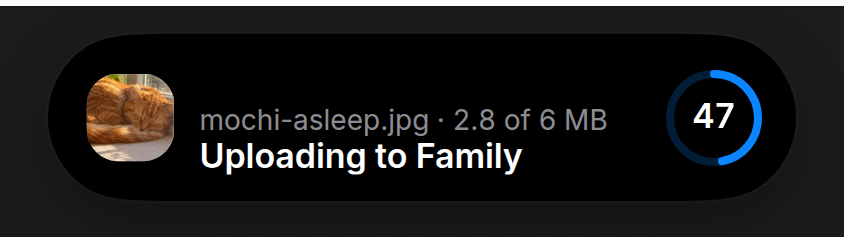
An upload that shows what it is sending. A posting app’s upload leads with a thumbnail of the photo and a ring with the percentage in it; this preset does the same, and says in one sentence where the file is going. Render it while the upload runs and remove it when it’s done; the activity starts on mount and ends on unmount.
Install
npx shadcn@latest add https://islandcn.dev/r/upload-activity.jsonpnpm dlx shadcn@latest add https://islandcn.dev/r/upload-activity.jsonyarn dlx shadcn@latest add https://islandcn.dev/r/upload-activity.jsonbunx shadcn@latest add https://islandcn.dev/r/upload-activity.jsonThis writes components/islandcn/upload-activity.tsx and media-row.tsx (the thumbnail, the row and the ring it shares with the nearby transfer), plus the content kit and the engine if the project lacks them. Mount the island once first, see Installation.
What it shows
- Compact: the photo’s thumbnail on the leading side (24 pt, with continuous corners) and a ring with the percentage in it on the trailing side. At 100% the ring turns into a check.
- Split: its compact pair, in the pill or in the 62.18 wide capsule, where the thumbnail drops to 22 pt so the ring after it stays whole. When the split doesn’t fit at all, the fallback is the ring alone.
- Expanded: one row, as tall as an incoming call. The thumbnail large on the leading side, then the file name in grey with the bytes sent after it (“2.5 of 6 MB”), over a white sentence that says where it goes (“Uploading to Family”), and the ring large on the trailing side. Done, the sentence reads “Uploaded to Family”, the size is the total, and the ring is a check.
- Without a photo: leave out
srcand the thumbnail is a tile of the accent with the upload glyph, so a PDF or a video still has a picture. - With
onCancel: the large ring holds a stop square and pressing it callsonCancel, as a nearby share’s ring does; the size still follows the file name, and withouttotalBytesthe percentage goes there instead while it runs. - Updates: the percentage in the large ring turns over its digits, and the ring fills with a short ease.
Usage
"use client";

import { UploadActivity } from "@/components/islandcn/upload-activity";

export const UploadIsland = ({ file, preview, progress }: { file: File; preview: string; progress: number }) => (
  <UploadActivity fileName={file.name} src={preview} progress={progress} totalBytes={file.size} destination="Family" />
);
preview is any image URL for the file, such as URL.createObjectURL(file) for a photo. Pass progress from your own upload state; the ring eases between values, so updating it a few times a second is enough. Keep it mounted for a moment at 1 so the check shows, then unmount it.
To word it as a post, pass your own sentences: title="Posting to your story" and doneTitle="Posted".
Props
fileNamestring
File name, the grey line in the expanded view.
stringprogressnumber
0 to 1. At 1 it shows a check and the done sentence.
numbersrc?string
The photo or video frame being uploaded, shown as its thumbnail. Without it, a tile with the upload glyph.
stringtotalBytes?number
Total size, for "2.5 of 6 MB" after the file name, and the size alone once it lands. Without it the name stands alone.
numberdestination?string
Where it's going, such as "Family", for "Uploading to Family". Without it the sentence is "Uploading".
stringtitle?string
The white sentence while it uploads, such as "Posting to your story". Defaults to "Uploading to" the destination.
stringdoneTitle?string
The white sentence once it's done, such as "Posted". Defaults to "Uploaded to" the destination.
stringaccent?string
Colour of the ring and the check.
stringblueonCancel?() => void
Makes the expanded ring a stop button while it runs. Without `totalBytes`, the percentage follows the file name in its place.
() => voidid?string
Activity id.
string"upload"priority?number
Higher priority takes the main pill when two activities run.
number0Make it yours
Install this preset when it is exactly what you need. Otherwise open it in the Playground, change what each region shows and copy the code, or read its source for technique and build your own island on the engine.