

Recording
A recording indicator with an elapsed timer and a level meter, for audio, screen or camera capture.
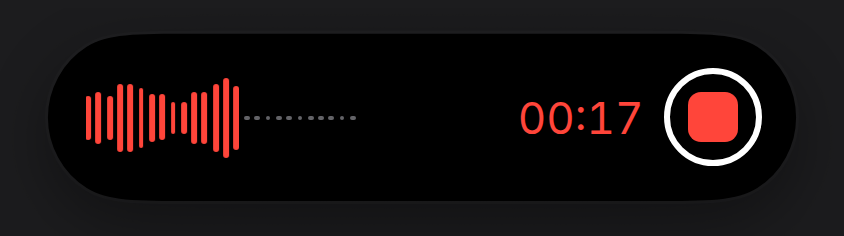
A waveform and the time elapsed, laid out as the system’s voice recorder shows them. Feed it live levels from an AnalyserNode if you have them; without them it runs a built-in loop.
Install
npx shadcn@latest add https://islandcn.dev/r/recording-activity.jsonpnpm dlx shadcn@latest add https://islandcn.dev/r/recording-activity.jsonyarn dlx shadcn@latest add https://islandcn.dev/r/recording-activity.jsonbunx shadcn@latest add https://islandcn.dev/r/recording-activity.jsonThis writes components/islandcn/recording-activity.tsx, plus the content kit and the engine if the project lacks them. Mount the island once first, see Installation.
What it shows
- Compact: a red waveform and the elapsed time in red; both turn grey and hold still while paused. Screen and camera recordings show a pulsing red dot instead of the waveform.
- Split: in the 62.18 wide capsule, a short waveform (or the dot) alone. When the pair is too wide for the split, the fallback is the short waveform and the time.
- Expanded: one row, no title. On the left, the waveform: its bars grow from a centre line and scroll left while recording, with grey dots after them where the recording hasn’t reached. On the right, the elapsed time in 22 pt red figures (“02:50”), then, with
onStop, the stop button: a red rounded square in a thin white ring, concentric with the island’s corner. WithonTogglePause, a small grey pause or resume button sits at the left end, concentric with the other corner; leave it out to match the system’s recorder, which has none. Screen and camera recordings show their glyph and title where the waveform goes. - Updates: the time turns over its digits with the engine’s
IslandNumber.
Usage
"use client";

import { RecordingActivity, type RecordingState } from "@/components/islandcn/recording-activity";

export const ScreenRecording = ({ state, stop, togglePause }: { state: RecordingState; stop: () => void; togglePause: () => void }) => (
  <RecordingActivity kind="screen" state={state} onStop={stop} onTogglePause={togglePause} />
);
state is { kind: "recording", since } with the epoch ms it started (minus any paused time), or { kind: "paused", elapsed } in ms.
Props
state{ kind: "recording"; since: number } | { kind: "paused"; elapsed: number }
Recording since a moment, or paused with the length so far.
{ kind: "recording"; since: number } | { kind: "paused"; elapsed: number }kind?"audio" | "screen" | "camera"
Picks the glyph and the default title.
"audio" | "screen" | "camera""audio"title?string
Names the recording in the labels, and in the expanded row for screen and camera.
string"Voice memo", "Screen recording" or "Video"accent?string
Accent colour.
stringredonStop?() => void
Stop button at the right edge, a red square in a white ring.
() => voidonTogglePause?() => void
Pause or resume button, a small grey circle at the left end. The system's recorder has none.
() => voidlevels?readonly number[]
Live levels, 0 to 1, oldest first. The newest are the waveform's bars.
readonly number[]a built-in loopid?string
Activity id.
string"recording"priority?number
Higher priority takes the main pill when two activities run.
number0Make it yours
Install this preset when it is exactly what you need. Otherwise open it in the Playground, change what each region shows and copy the code, or read its source for technique and build your own island on the engine.