

Split
Two activities at once: one stays attached to the pill, the other moves to a capsule beside it.
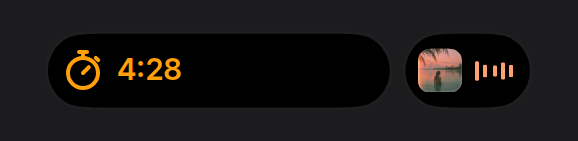
Not a component you need: the split is what the engine does whenever two activities run. This item installs the demo, a timer and music together, so you can see it and read how priority picks the sides.
Install
npx shadcn@latest add https://islandcn.dev/r/split-demo.jsonpnpm dlx shadcn@latest add https://islandcn.dev/r/split-demo.jsonyarn dlx shadcn@latest add https://islandcn.dev/r/split-demo.jsonbunx shadcn@latest add https://islandcn.dev/r/split-demo.jsonThis writes examples/split-demo.tsx, the shared content kit it builds on (components/islandcn/theme.ts, glyph.tsx, island-text.tsx and friends), and the engine in lib/island/ if the project doesn’t have it. Mount the island once first, see Installation.
What it shows
- The attached pill shows the primary activity (highest
priority, then first started). It grows only to the left of the sensor and keeps its right end at the sensor’s edge. - The capsule to its right shows the second activity. It pinches off the pill with a gooey neck when the second activity starts and merges back when either ends.
- On the reference phone both shapes show their activity’s compact pair: here the timer’s glyph and time in the pill, and the cover and meter in the capsule. The capsule is 62.18 wide whatever its trailing value, which leaves about 20 pt after the glyph, so the meter fits and a four-character time would be cut. That is why music, not the timer, takes the capsule in this demo.
- Each preset also passes a
MinimalPairas itsminimalview, the fallback when the two pairs together are wider than 290. - Hold either shape to expand that activity.
Usage
"use client";

import { NowPlayingActivity } from "@/components/islandcn/now-playing-activity";
import { TimerActivity } from "@/components/islandcn/timer-activity";

// The timer has the higher priority, so it takes the attached pill.
export const Kitchen = ({ endsAt, startedAt }: { endsAt: number; startedAt: number }) => (
  <>
    <TimerActivity state={{ kind: "running", endsAt }} duration={8 * 60_000} priority={1} />
    <NowPlayingActivity title="Saltwater Static" artist="The Lagoon Club" duration={214_000} playback={{ kind: "playing", startedAt }} />
  </>
);
The item also writes examples/demo-stage.tsx, the phone-width stage the demo runs on.
Props
SplitDemo
primary?"timer" | "music"
Which activity takes the attached pill.
"timer" | "music""timer"view?"live" | "compact" | "expanded"
Island state to hold.
"live" | "compact" | "expanded""live"height?number
Stage height in px.
number300theme?Partial<DemoStageTheme>
Stage colours, merged over the light screen.
Partial<DemoStageTheme>the light stagereducedMotion?"user" | "always" | "never"
The island's reduced-motion setting.
"user" | "always" | "never""user"Make it yours
Install this preset when it is exactly what you need. Otherwise open it in the Playground, change what each region shows and copy the code, or read its source for technique and build your own island on the engine.