

Battery
Charge level and charging state, shown briefly when power connects or runs low.
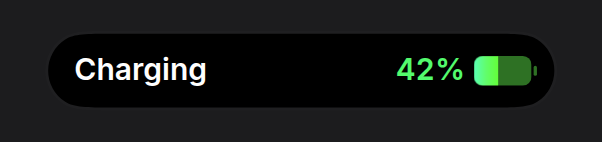
A battery for a device or accessory, shown as the system’s charging indicator: one row, the label on the left and the level on the right. Plug in and the pill appears, its battery fills to the level, it holds for about two seconds and it goes. Expanding it opens the same row with one grey line under the label, not a card.
Install
npx shadcn@latest add https://islandcn.dev/r/battery-activity.jsonpnpm dlx shadcn@latest add https://islandcn.dev/r/battery-activity.jsonyarn dlx shadcn@latest add https://islandcn.dev/r/battery-activity.jsonbunx shadcn@latest add https://islandcn.dev/r/battery-activity.jsonThis writes components/islandcn/battery-activity.tsx, plus the content kit and the engine if the project lacks them. Mount the island once first, see Installation.
What it shows
- Appearing: the battery’s charge fills in from empty over a second as the pill opens. With
dismissAfterthe pill leaves by itself that long after it appears, and comes back each timechargingturns on again. While the island is open it waits, and leaves a beat after it closes. Reduced motion shows the level at once. - Compact: the pill takes the widest sides the engine allows, 253 pt (the charging indicator is about 317). On the left, “Charging” (or “Charged” when full) in 15 pt semibold white, 14.5 pt in from the pill’s end; unplugged, the device’s
nameinstead. On the right, the percentage at the same size and weight, then a 35.5 pt battery: a solid rounded body with the charge filled from the left, the empty part and the nub darker, and no bolt. While charging the percentage is green and the fill runs mint to lime. Red belowlowThreshold, white otherwise. The label stays white in every state. If the percentage runs wide in a fallback font, the battery narrows before the spacing does. - Expanded: a long press,
expand()oralertOnStartopens the same row in the shortest expanded island the engine draws (84 pt tall), with one line under the label in 13 pt grey: “Full in 55 min” while charging below full withtimeToFull; otherwise the device’snamewhile charging or full, “Low battery” belowlowThresholdand “Not charging” when unplugged. A battery with the default name that is full, or charging with notimeToFull, has nothing to add and shows the label alone (“Charged” already says it is full). The two lines and the battery are centred on the island’s middle, both ends 18.5 pt in, clear of the island’s content clip. No large number and no bar. - Split: the battery alone in the 62.18 wide capsule, its fill the level. When the pair is too wide for the split, the fallback is the battery and the percentage.
- Updates: the percentage changes its digits in place without a jump in width.
- Screen readers hear the name, the percentage and the state, with the time until full while charging when you pass
timeToFull.
Usage
"use client";

import { BatteryActivity, chargingIndicatorHold } from "@/components/islandcn/battery-activity";

export const HeadphonesBattery = ({ level, charging }: { level: number; charging: boolean }) => (
  <BatteryActivity
    name="Headphones"
    level={level}
    charging={charging}
    timeToFull={charging ? 35 * 60_000 : undefined}
    dismissAfter={chargingIndicatorHold}
  />
);
Keep it mounted while the device is connected: it shows when it mounts and each time charging turns on, then leaves after chargingIndicatorHold (3.3 s). Without dismissAfter it stays until you unmount it; a battery that sits in the island all day is noise.
Props
levelnumber
Charge, 0 to 1.
numberchargingboolean
Plugged in and charging.
booleantimeToFull?number
Time until full in ms. Shown as "Full in 55 min" under the expanded label while charging below full, and heard by screen readers. The compact pill shows no time.
numberlowThreshold?number
Below this the battery turns red.
number0.2name?string
Device name, such as "Headphones": the label while unplugged, the line under the expanded label while charging with no time to full, and what screen readers hear.
string"Battery"alertOnStart?boolean
Expand briefly when it appears. The system's charging indicator never does.
booleanfalsedismissAfter?number
Leave the island this many ms after appearing, and show again for the same time each time `charging` turns on. Waits while the island is open. `chargingIndicatorHold` (3300) is the system's length.
numbernone (stays while mounted)onDismiss?() => void
Called when it leaves by itself after `dismissAfter`.
() => voidid?string
Activity id.
string"battery"priority?number
Higher priority takes the main pill when two activities run.
number0Make it yours
Install this preset when it is exactly what you need. Otherwise open it in the Playground, change what each region shows and copy the code, or read its source for technique and build your own island on the engine.